Advanced Extron audio visual control, signal distribution and meeting room system

Extron AV Solutions Sydney

Extron control, AV distribution and meeting-room integration.

Masters Voice Technology designs, configures, installs and supports Extron control systems, TouchLink Pro interfaces, NAV Pro AV over IP, DTP3 signal distribution, ShareLink collaboration, audio DSP and enterprise AV management across Sydney and New South Wales.

Extron-Certified Capability TouchLink Pro Control NAV Pro AV over IP DTP and DTP3 Systems Audio DSP In-house AV Integration
Professional AV Infrastructure

What does an Extron AV system do?

Extron provides professional hardware and software for controlling, switching, extending, processing, distributing and monitoring audio visual systems.

An Extron system can coordinate displays, projection, video conferencing, microphones, loudspeakers, room controls, wireless presentation, AV over IP, room scheduling and enterprise monitoring.

Extron is often selected for corporate meeting rooms, government facilities, classrooms, lecture theatres, council chambers, auditoriums and divisible spaces where dependable operation, repeatable design and straightforward user control are important.

Masters Voice Technology combines Extron integration with commercial audio visual installation , licensed electrical work, structured communications cabling and ongoing AV support.

One integrated Extron solution can include

  • TouchLink Pro touchscreen or button-panel room control
  • IP Link Pro xi control processors and automation
  • NAV Pro AV over IP encoders, decoders and management
  • DTP3 video, audio and control extension over CAT 6A
  • Presentation switching, scaling and matrix routing
  • ShareLink wired and wireless collaboration
  • DMP Plus audio DSP, AEC and Dante networking
  • Room scheduling and enterprise AV monitoring
Design · Configure · Install · Support

Complete Extron integration from one technical team.

Our scope can include system engineering, product selection, programming, installation, electrical and data work, testing, commissioning, documentation and ongoing support.

01

System design

Functional requirements, signal-flow design, processor selection, control architecture, network planning and equipment schedules.


02

Extron control configuration

IP Link Pro control, TouchLink interfaces, button panels, room automation, device drivers, monitoring and third-party control.

03

AV distribution

NAV Pro AV over IP, DTP3 extension, matrix switching, scaling, USB distribution and multi-display signal routing.

04

Audio system integration

DMP Plus DSP, acoustic echo cancellation, automixing, Dante, amplifiers, microphones and loudspeaker integration.

05

Installation and commissioning

AV racks, cabling, electrical work, endpoint commissioning, configuration, functional testing, training and handover.

06

Extron support and upgrades

Fault diagnosis, configuration changes, replacement planning, firmware management, backups and preventative maintenance.

Extron Products and Solutions

Selecting the right Extron products for the application.

A dependable Extron AV system starts with matching the control, signal distribution, collaboration, audio processing and network architecture to the room, users and long-term support requirements.

Control Processor Extron IPCP Pro 360Q xi IP Link Pro control processor
IP Link Pro xi Control

Extron IPCP Pro 360Q xi

A high-performance quad-core control processor for coordinating displays, projectors, AV switchers, room audio, lighting, blinds and compatible third-party building systems.

AV control Dedicated AV LAN TouchLink Pro Room automation
Touchscreen Control Extron TLP Pro 1025T TouchLink Pro tabletop touchscreen
TouchLink Pro Interface

Extron TLP Pro 1025T

A 10-inch tabletop touchscreen for customised control of video conferencing, displays, source selection, room audio, lighting, blinds and presentation modes.

10-inch display PoE Custom interface Meeting-room control
Pro AV over IP Extron NAV E 222 USB-C and HDMI AV over IP encoder
NAV Pro AV over IP

Extron NAV E 222

A two-input NAV encoder with USB-C and HDMI switching for distributing high-quality video and audio over a managed one-gigabit Ethernet network.

USB-C input HDMI input 4K video AES67 audio
Presentation Matrix Extron DTP3 CrossPoint presentation matrix switcher range
DTP3 Signal Distribution

Extron DTP3 CrossPoint Series

Integrated presentation matrix systems combining HDMI and DTP3 switching, scaling, audio DSP with acoustic echo cancellation, Dante options, amplification and control processing.

4K/60 video 100 m extension Audio DSP Divisible rooms
Wireless Collaboration Extron ShareLink Pro 2500 wireless presentation system
Wired and Wireless Presentation

Extron ShareLink Pro 2500

A dual-screen 4K presentation and collaboration system that allows wired and wireless users to share content from computers, tablets and mobile devices.
Dual displays BYOD sharing ConferenceShare Moderator mode
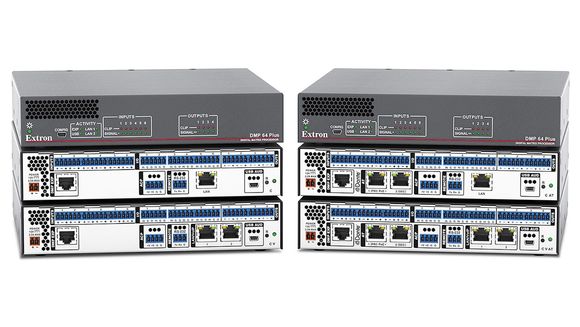
Professional Audio DSP Extron DMP 64 Plus digital audio matrix processor range
ProDSP Audio Processing

Extron DMP 64 Plus

A compact digital matrix processor providing microphone and line inputs, acoustic echo cancellation, automixing, USB audio and optional Dante or VoIP connectivity.

Six AEC channels USB audio Dante options Meeting-room DSP

Not sure which Extron architecture your project requires?

Masters Voice Technology can assess the room, existing equipment, conferencing platform, signal distances, network capability, control requirements, audio performance and future expansion needs before recommending the appropriate Extron products and support model.

Extron Control Systems

Put conferencing and room controls into one clear user experience.

Extron IP Link Pro processors and TouchLink Pro interfaces can coordinate displays, sources, room audio, lighting, blinds and compatible third-party technology.

Extron Control for Microsoft Teams Rooms can also place compatible room controls within the familiar Teams Rooms user experience, reducing the need for separate touchscreens and disconnected control interfaces.

Masters Voice Technology designs the complete room around the user, including displays, cameras, microphones, speakers, table connectivity, USB extension, electrical and data infrastructure.

Common room-control functions

  • Start meeting, presentation and BYOD modes
  • Display and projector power control
  • Source selection and content routing
  • Microphone, speaker and volume controls
  • Camera selection and compatible presets
  • Lighting, blinds and environmental controls
  • Room-combine and divisible-space workflows
  • Protected technician and administration pages
Extron Professional Audio

Clear meeting-room and presentation audio requires more than speakers.

Microphone placement, acoustic echo cancellation, gain structure, automixing, loudspeaker coverage and conferencing integration all affect whether a room is comfortable and intelligible.

01

DMP Plus audio DSP

Matrix processing, microphone mixing, acoustic echo cancellation, USB audio and signal routing for conferencing and presentation spaces.

02

Dante and AES67

Network audio can connect compatible microphones, processors, amplifiers and rooms while reducing conventional point-to-point audio cabling.

Explore Dante audio networking →
03

Amplifiers and loudspeakers

Appropriate amplification and loudspeaker placement provide even coverage, clear speech and predictable system performance.

Extron System Upgrades

Can an existing Extron system be upgraded without replacing everything?

Often, yes. The best result starts with an audit of the existing processor, endpoints, signal paths, programming, network, displays and connected equipment.

01

Existing-system audit

Record the installed Extron equipment, configuration files, network settings, firmware, connected devices and system faults.

02

Retain or replace

Identify serviceable equipment that can remain and hardware that is obsolete, unsupported, unreliable or incompatible with the new outcome.

03

Staged migration

Plan changes in logical stages to reduce downtime, protect existing investment and provide a clear pathway for future expansion.

Enterprise AV Management

Manage rooms as an operational technology portfolio.

When an organisation operates many meeting rooms or teaching spaces, the challenge moves beyond individual equipment and becomes one of visibility, consistency and support.

Extron room scheduling can display availability and allow supported reservations at the room entrance. GlobalViewer Enterprise can help authorised teams monitor rooms and devices, support help-desk workflows and analyse utilisation.

Enterprise outcomes

  • See whether supported rooms and devices are online
  • Identify recurring room and equipment faults
  • Coordinate standard settings and operating workflows
  • Support help-desk and onsite escalation processes
  • Track selected room and equipment utilisation
  • Plan maintenance, replacement and asset refresh programs
  • Provide consistent room-booking information to users
Design · Install · Commission · Support

Our Extron AV integration process.

01

Discovery

Confirm room functions, user workflows, existing equipment, network requirements and project constraints.

02

Engineering

Develop signal flow, product selection, control architecture, rack layouts, cabling requirements and project documentation.

03

Delivery

Complete configuration, AV installation, electrical and data work, testing, commissioning and user training.

04

Support

Provide documentation, backups, preventative maintenance, configuration changes and onsite technical support.

Frequently Asked Questions

Extron programming and AV integration questions.

What does an Extron integrator do?
An Extron integrator assesses the room requirements, designs the signal and control architecture, selects suitable Extron products, configures the system, installs the hardware, commissions all functions and provides ongoing support.
Can Extron control a Microsoft Teams Room?
Yes. Extron Control for Microsoft Teams Rooms can integrate compatible room-control and automation functions into a supported Windows-based Teams Rooms environment.
What is Extron NAV Pro AV over IP?
NAV Pro AV over IP is Extron’s networked platform for distributing high-quality video, audio, USB, Ethernet and control between compatible encoders and decoders over managed IP networks.
What is the difference between Extron NAV and DTP3?
NAV distributes AV over managed network infrastructure and is suited to scalable, dynamic routing. DTP3 extends uncompressed signals over dedicated CAT 6A cabling and is often suited to defined room or matrix-switching applications.
Can an older Extron system be upgraded?
Often, yes. We first audit the processor, endpoints, configuration, network, firmware and connected equipment before recommending which components can remain and which should be replaced.
What is Extron ShareLink Pro?
ShareLink Pro is a professional wired and wireless collaboration platform that allows users to present content from compatible laptops, tablets and mobile devices to meeting-room displays.
Does Extron support Dante audio?
Selected Extron digital signal processors, presentation systems and audio products support Dante and AES67 network audio. The final system should be designed around the required channel count, network and redundancy requirements.
How much does an Extron AV system cost?
Pricing depends on the number of rooms, inputs, displays, network endpoints, control interfaces, DSP channels, programming, installation, cabling and support requirements. A functional scope and site assessment are normally required before accurate pricing can be prepared.
Do you provide Extron support outside Sydney?
Masters Voice Technology provides onsite services across Greater Sydney, Western Sydney, Macarthur and the Mid North Coast. Regional NSW and remote support can also be arranged for suitable systems.
Discuss an Extron Project

Plan an Extron system that is dependable, intuitive and supportable.

Contact Masters Voice Technology about an Extron meeting room, TouchLink control system, NAV Pro AV over IP deployment, DTP3 presentation system, ShareLink collaboration solution, audio DSP, existing-system upgrade or ongoing AV support.

Sydney Extron integration  ·  Parramatta AV services  ·  Mid North Coast support