MUSE or NetLinx control
The controller runs the programming that coordinates connected AV, software, lighting and third-party devices.
AMX Control Systems Sydney
Learn how AMX can bring room control, touch interfaces, video distribution, table connectivity and third-party technology into one coordinated AV system. Masters Voice Technology designs, programs, installs, upgrades and supports AMX systems across Sydney and New South Wales.
AMX is a professional control and networked AV platform used to make complex room technology operate through a clear, coordinated user experience.
In a typical meeting room, classroom or public facility, several different technologies may need to work together: displays, projectors, video conferencing, microphones, speakers, lighting, motorised blinds, source devices and networked video.
An AMX controller acts as the automation engine. It receives a command from a touchscreen, keypad, application or automated event, and then instructs the connected equipment to perform the required action.
The objective is not simply to install more hardware. A properly designed AMX system should make the room easier to start, operate, support and expand. Masters Voice Technology combines AMX programming with commercial audio visual integration , electrical work and structured communications cabling.
AMX is not a single product. It is a collection of control, interface, video-distribution and connectivity technologies that can be selected according to the project requirements.
The controller runs the programming that coordinates connected AV, software, lighting and third-party devices.
Touch panels provide room control, scheduling, web interfaces, application access and supported Zoom Rooms functions.
Encoders and decoders move video, audio, USB and control between sources, rooms and displays using network infrastructure.
Modular table boxes provide convenient access to USB-C, HDMI, network, power, control buttons and retractable cables.
The correct AMX solution depends on the size of the room, number of controlled devices, network capability, video quality, latency, conferencing workflows, security requirements and future expansion.
A rack-mounted MUSE automation controller for larger and more complex rooms, with serial, relay, IR and I/O connectivity plus an isolated ICSLan device network.
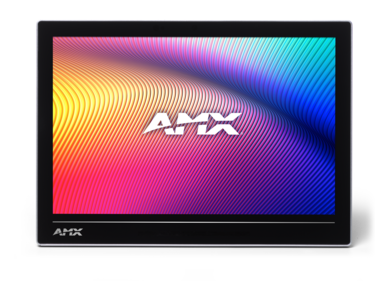
A 10.1-inch professional touchscreen that can operate as an AMX control interface, room scheduler, Zoom Rooms controller, web kiosk or dedicated Android application panel.
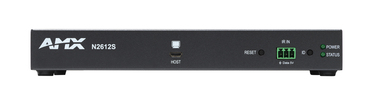
A dual-stream 4K60 encoder suited to local networked video, meeting rooms, classrooms, courtrooms and venues that require high-quality, low-latency content distribution.
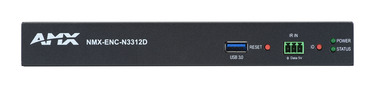
A 4K60 H.26x and Dante AV-H encoder for lower-bandwidth streaming, remote distribution, recording, digital signage and compatible wide-area network applications.
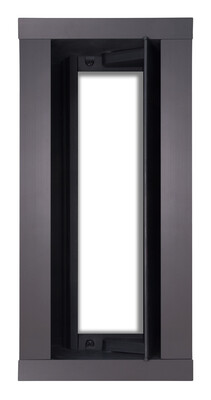
A modular, flush-mounted table enclosure that can be configured with power, USB-C, HDMI, data, retractable cables and control modules for meeting rooms and classrooms.

A customised Node-RED environment that allows developers to build logical automation flows visually while retaining the ability to develop custom JavaScript nodes.
Organisations with an existing AMX system may already use NetLinx, while new projects may consider the more open MUSE automation platform.
MUSE is the current AMX automation platform. It supports standard development technologies including JavaScript, Python and Groovy, together with visual Node-RED-based programming through MUSE Automator.
Many established AMX installations use NX or earlier NetLinx controllers and custom programming. These systems may remain operational, but should be audited before displays, touch panels, networks or controlled equipment are changed.
A move from NetLinx to MUSE should be treated as a planned engineering migration rather than a simple processor swap. The existing code, interfaces, device drivers, network architecture and operational workflows must be reviewed before the appropriate upgrade pathway is selected.
SVSI encoders and decoders move video, audio, USB and control across network infrastructure. The product family should be selected according to image quality, latency, bandwidth, streaming and recording requirements.
Varia panels use selectable personas that define how the panel operates, allowing the same hardware family to support room control, scheduling, applications and collaboration workflows.
A panel can be configured as an AMX G5 control interface, AMX Book room scheduler, web kiosk, Zoom Rooms controller or dedicated Android application display. This can simplify standardisation across different rooms while retaining flexibility.
Varia is available in several screen sizes and mounting formats, including wall, glass, VESA and optional tabletop arrangements. No-Comm variants are available for environments that exclude cameras, microphones, NFC and selected wireless functions.
HydraPort is a modular table and lectern connectivity platform that can combine power, video, USB, networking and control in a low-profile enclosure.
The correct configuration depends on how users connect laptops, whether the room supports BYOD conferencing, the location of equipment, charging requirements and how cables will be extended beneath the table.
For contemporary rooms, a retractable USB-C-to-HDMI module can provide a convenient laptop video connection while keeping the cable stored within the table enclosure when it is not in use.
AMX is most valuable when its control, interface, networked-video and connectivity capabilities align with a defined operational need.
Retaining compatible infrastructure and programming may reduce disruption where an organisation already has an established AMX estate.
MUSE and NetLinx can coordinate complex room logic, third-party devices, scheduling and operational workflows.
SVSI provides several codec and bandwidth choices for local, enterprise and remote AV distribution.
Varia panels can be configured for control, scheduling, Zoom Rooms, web applications and secure No-Comm environments.
HydraPort provides a modular approach to power, USB-C, HDMI, data and control at tables and lecterns.
AMX products can form part of a wider design that also uses Q-SYS, Crestron, Extron, Dante or other compatible equipment.
Platform selection should be based on the project outcome rather than brand preference alone. Masters Voice Technology can also assess alternatives including Q-SYS integration, Crestron programming and Extron AV solutions.
The AMX platform can be configured differently according to the people, spaces, network architecture and support model involved.
Room control, scheduling, video conferencing, wireless presentation, table connectivity and consistent workplace standards.
Corporate AV solutions →Hearing rooms, courtrooms, council facilities, secure interfaces, networked video and controlled presentation environments.
Government AV solutions →Classroom controls, lecture spaces, auditoriums, collaboration, AV-over-IP distribution and repeatable campus-room standards.
Education AV solutions →Multi-display distribution, digital signage, function-room controls, room presets and centralised operator interfaces.
Venue AV solutions →Volunteer-friendly controls, presentation routing, digital signage, recording, streaming and distributed video.
House-of-worship AV →Standardised programming, networked video, room scheduling, support documentation and coordinated technology lifecycle management.
Explore TechFlow360 →Often, yes. The first step is to understand what has been installed, what still performs reliably and whether the original programming files are available.
Record the controller, touch panels, SVSI endpoints, switchers, connected devices, firmware, network settings and current faults.
Locate NetLinx or MUSE source code, touchscreen files, modules, device drivers, credentials, configuration exports and drawings.
Decide which components can remain, which need replacement and whether the upgrade should retain NetLinx or move to MUSE.
Confirm new displays, conferencing systems, network switches, control interfaces and AV endpoints can operate with the proposed architecture.
Complete offsite development and staged testing before changing operational rooms or critical public-facing systems.
Maintain current backups, drawings, asset records, firmware plans, passwords and a defined process for future programming changes.
AMX programming is coordinated with the system design, installation, electrical, data and ongoing support requirements.
Masters Voice Technology holds HARMAN-certified AMX programming capability and supports AMX systems across corporate, government, education and complex commercial AV environments.
Our multi-platform capability is useful where an AMX controller or SVSI network must operate with Q-SYS, Crestron, Extron, Dante, Microsoft Teams Rooms or compatible third-party products.
Contact Masters Voice Technology about AMX MUSE programming, an existing NetLinx system, Varia touch panels, SVSI AV over IP, HydraPort table connectivity, fault diagnosis or ongoing managed support.
Sydney AMX integration · Parramatta AV services · Mid North Coast support
