Council Chambers AV
July 14, 2026
arrow up right

Council Chamber AV System Guide | Government AV Sydney

Australian parliamentary chamber with tiered seating and integrated meeting positions
Local Government AV Design Guide

How to Design a Council Chamber AV System for Hybrid Meetings, Recording and Livestreaming

A practical guide to council chamber microphones, camera coverage, remote participation, meeting recording, public livestreaming, hearing assistance, evidence presentation and reliable room control.

Government AV Systems Sydney Council Chamber Technology Masters Voice Technology
Discussion Audio Delegate microphones and controlled speech reinforcement
Hybrid Meetings Remote councillors, presenters and public participants
Recording and Streaming Consistent program audio, cameras and meeting content
Accessible Participation Hearing assistance, captions and readable visual content
More Than a Large Meeting Room

A council chamber AV system must support formal proceedings and public participation

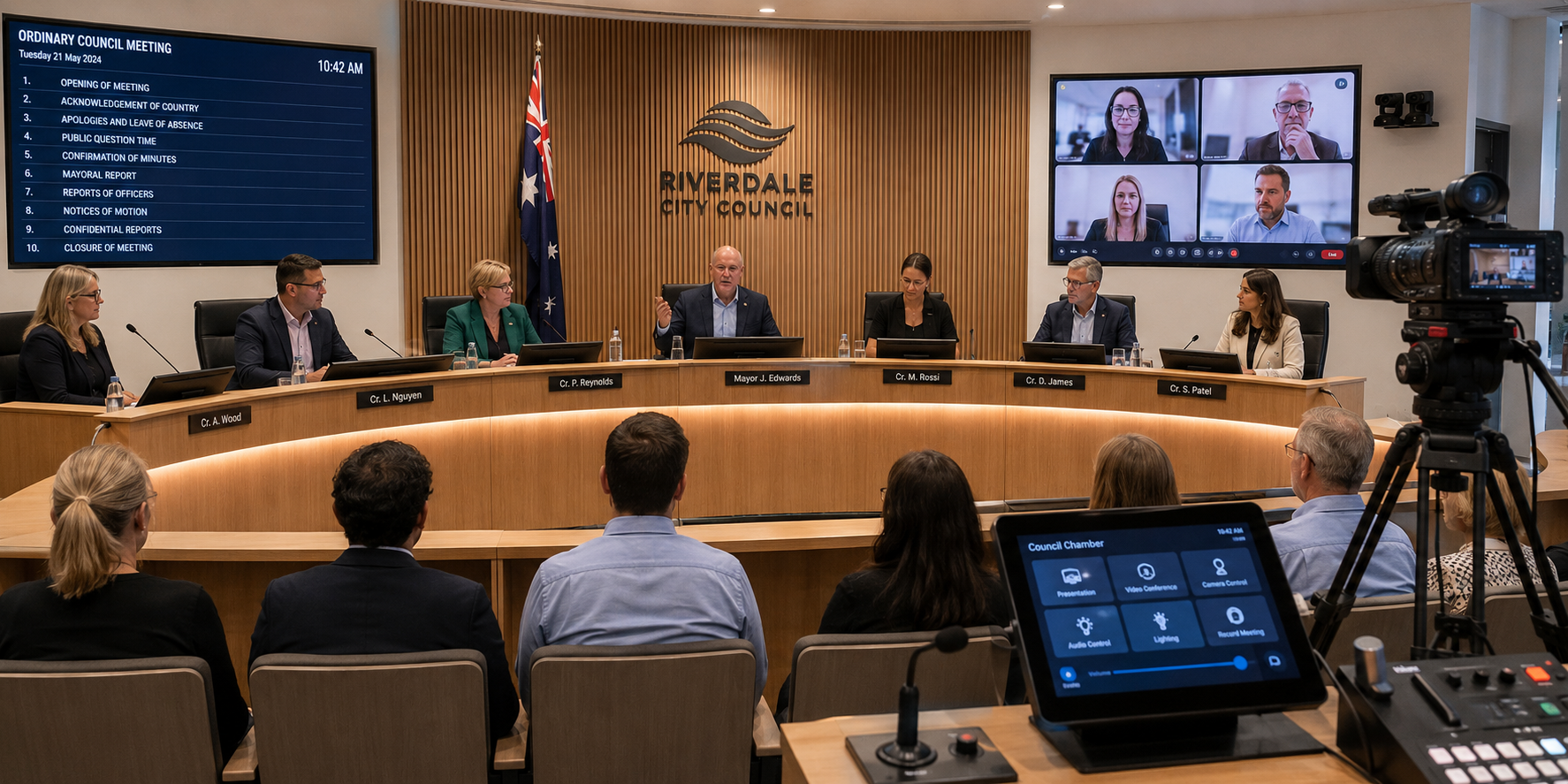
Council chambers have more complex requirements than conventional boardrooms. The audio visual system must support multiple seated speakers, a presiding chair, council officers, public presenters, remote attendees, displayed documents, meeting records and public viewing.

A standard video-conferencing kit may be suitable for a small committee room, but a full council chamber requires a coordinated system designed around formal meeting procedures.

Microphones, cameras, displays, loudspeakers, recording equipment, streaming outputs and user controls must operate as one predictable workflow. Staff should not need to manage several independent devices while also administering the meeting.

Masters Voice Technology designs and supports government audio visual systems for councils, courts, libraries, public facilities and government meeting environments across Sydney and New South Wales.

Functional AV Design

Design the council chamber around how meetings actually operate

Equipment selection should begin only after the meeting workflow, participant positions, public-access requirements and staff responsibilities have been documented.

01

Mayor or chairperson

The presiding position may require microphone priority, agenda control, camera recall, voting functions and the ability to manage speaking requests.

02

Councillors and committee members

Each participant needs clear speech capture, access to displayed content and a consistent method of requesting or activating a microphone.

03

General manager and council officers

Staff positions may require document presentation, conferencing, confidence displays and access to operational room controls.

04

Public speakers and presenters

A lectern or presentation position should support a microphone, content sharing, readable displays and appropriate camera coverage.

05

Remote participants

Approved remote councillors, staff, consultants and presenters need reliable two-way audio, video, content and meeting feedback.

06

Public gallery and online audience

In-room visitors and livestream viewers need clear speech, relevant camera views, readable agenda content and consistent meeting audio.

Document the complete meeting journey

The design should consider what happens before the meeting, during ordinary discussion, during a public presentation, when a participant joins remotely, when confidential business begins and when the final recording is transferred or archived.

Integrated Council Chamber Technology

Core components of a modern council chamber audio visual system

A council chamber AV system normally combines specialist discussion audio, cameras, conferencing, presentation, recording, streaming, accessibility and centralised control.

Delegate microphones

Individual or shared microphone positions capture speech from the chairperson, councillors, council officers and public presenters.

Digital signal processing

A DSP manages microphone mixing, acoustic echo cancellation, loudspeaker zones, recording feeds and conferencing audio.

PTZ camera system

Multiple cameras provide views of the chair, councillors, officers, public lectern and complete chamber.

Hybrid meeting platform

Video conferencing connects authorised remote attendees through the council’s approved collaboration environment.

Commercial displays

Displays present agenda items, remote participants, planning documents, presentations and meeting information.

Recording and streaming

A coordinated program output combines selected cameras, chamber audio and presentation content for recording or public distribution.

Assistive listening

Hearing-loop, infrared or radio-frequency systems can distribute clear meeting audio to compatible receivers or hearing devices.

Room-control system

A touchscreen or staff interface manages meeting modes, displays, sources, cameras, audio, recording and system status.

AV and network infrastructure

Equipment racks, power, structured cabling, network switches, signal extension and documented cable pathways support the system.

Council Chamber Discussion Audio

Choosing the right council chamber microphone system

The microphone system is the foundation of the chamber. It must capture speech consistently, identify the active speaker and provide suitable audio to the room, remote participants, recording system and public livestream.

Delegate discussion microphones

Purpose-built discussion units can provide individual microphones, push-to-talk controls, request-to-speak workflows, participant identification and chairperson priority.

  • Clear microphone activation status
  • Consistent microphone distance
  • Chairperson priority or override
  • Automatic camera preset recall
  • Optional voting and identification functions

Conventional gooseneck microphones

Installed gooseneck microphones can provide excellent voice capture when combined with suitable DSP, push-to-talk controls and careful desk integration.

  • Flexible selection of microphone length
  • Integration into custom desks and furniture
  • Connection to central DSP processing
  • Suitable for fixed chamber layouts
  • Potentially lower visual impact

Public lectern microphone

The public-address position should provide predictable pickup for speakers of different heights and levels of microphone experience.

Wireless microphones

Handheld or bodypack systems may support mobile presentations, accessibility needs, workshops and temporary room configurations.

Supplementary room microphones

Additional microphones may support audience questions, room ambience, recording or flexible committee layouts.

Microphone selection should follow the seating plan

The quantity, spacing and type of microphones should reflect the furniture layout, number of participants, expected speaking behaviour, camera workflow and whether each person requires an individual identified position.

Clear Speech Across the Chamber

Council chamber audio must be intelligible in the room and online

The microphone system captures speech, but the loudspeakers, room acoustics and digital processing determine whether participants and visitors can understand it comfortably.

01

Distributed loudspeakers

Ceiling or surface-mounted speakers can provide even speech coverage without forcing one loudspeaker to operate at excessive volume.

02

Acoustic echo cancellation

Correctly configured echo cancellation prevents room loudspeaker audio from being returned to remote participants as an echo.

03

Automatic microphone mixing

Automatic mixing can prioritise active speakers and reduce the background noise created by multiple open microphones.

04

Room acoustic control

Excessive reverberation, mechanical noise and reflective finishes can reduce speech clarity and recording quality.

05

Independent audio outputs

The room, conferencing platform, recording system, assistive listening and livestream may each require a separately managed mix.

06

System commissioning

The completed chamber should be tested from every seat, microphone position, remote connection and output destination.

Clear livestream audio begins inside the chamber

A recording platform cannot recover words that were not captured clearly. Reliable online audio starts with suitable microphones, controlled room acoustics and correctly commissioned DSP.

Remote Council Participation

Hybrid council meeting technology must connect remote and in-room participants equally

Remote councillors, council officers, consultants and public presenters need to see, hear and contribute without creating additional confusion for the people inside the chamber.

What remote participants need

  • Clear audio from every active chamber microphone
  • Appropriate camera views of the active speaker
  • Agenda, presentation and planning content
  • Confidence that their own microphone is active
  • A reliable return view of the chamber
  • A managed method of joining the meeting

What the chamber needs from remote participants

  • Consistent remote audio level
  • Clear participant identification
  • Video displayed in suitable locations
  • Controlled microphone and mute behaviour
  • Presentation content routed to required displays
  • Recording and livestream inclusion where authorised

Microsoft Teams

A dedicated Teams Rooms platform may suit councils standardised on Microsoft 365 and requiring centrally managed room operation.

Cisco Webex

Cisco conferencing can support purpose-built government, hearing-room and formal remote-participation workflows.

Flexible guest platforms

Some chambers may need approved guest-join or BYOD capability for consultants, presenters or external organisations.

Choose the operating model before selecting the conferencing hardware

Councils comparing a native room platform with laptop-based operation can review the Microsoft Teams Rooms versus BYOD guide and the broader meeting-room AV capability .

Council Chamber Video

Multiple camera views create a clearer council meeting experience

One wide-angle camera rarely provides suitable coverage of the chair, councillors, public lectern, council officers and complete chamber.

Chairperson camera

A dedicated view clearly presents the mayor or chair when opening, closing or directing the meeting.

Councillor cameras

One or more PTZ cameras can provide suitable views of councillor seating without relying on an excessively distant room shot.

Officer and executive camera

Council staff positions may require separate coverage for reports, responses and formal recommendations.

Public lectern camera

A preset view can frame public speakers and presenters without requiring manual camera adjustment for every contribution.

Wide chamber view

A wide shot establishes context, displays attendance and provides a fallback view while cameras move between positions.

Presentation and document view

Maps, reports, planning documents and visual evidence may need to be combined with the selected camera for remote and online viewers.

Automatic camera recall

The microphone system can trigger a stored camera preset when a councillor or presenter begins speaking. This reduces the need for a dedicated camera operator during routine meetings.

Manual production override

Staff should retain the ability to select a wide shot, exclude an unsuitable view or manage an unusual meeting situation manually.

Public Meeting Distribution

Design council meeting recording and livestreaming as part of the chamber system

Recording and streaming should not be treated as a separate device connected after the chamber is complete. The production output depends on coordinated cameras, microphones, presentation content and meeting controls.

01

Program video output

The selected camera, remote participant or presentation source is routed to the recording and streaming platform.

02

Dedicated recording mix

Chamber microphones, remote audio and other authorised sources are balanced specifically for the recorded audience.

03

Agenda and presentation content

Reports, slides, planning maps and supporting material can be shown full-screen or combined with a camera view.

04

Streaming platform connection

The AV system provides a stable output to the council’s approved streaming, webcasting or content-distribution platform.

05

Local recording

A hardware or software recorder can provide a local master file, backup or source for later publication.

06

Confidential-session control

Staff need an unambiguous workflow for pausing, excluding or ending public recording and streaming when required.

Provide a staff preview before content goes live

Council staff should be able to confirm the selected camera, presentation content and audio status before the program is recorded or distributed publicly.

Clear Visual Information

Council chamber displays must serve several audiences at once

Councillors, council officers, public presenters, gallery visitors, remote participants and livestream viewers may each require a different view of the same meeting.

Councillor confidence displays

Integrated or shared displays can present agenda items, remote participants, reports and presentation material to seated members.

Public-gallery displays

Appropriately positioned large displays help visitors follow agenda content, speakers and remote participation.

Chairperson and staff displays

Operational positions may require confidence views, meeting previews and room-control information not shown to the public.

Remote participant display

Remote councillors and presenters should appear where in-room participants can maintain natural visual engagement.

Planning and evidence presentation

High-resolution maps, drawings, photographs, reports and documents need suitable scaling and legibility.

Document camera or visual presenter

Physical documents, samples or printed evidence can be presented without relying on a participant’s personal device.

Display size should be based on viewing distance and content

A screen that is suitable for a remote participant’s face may still be too small for detailed planning drawings or text-heavy agenda material. Display quantity, size and location should follow the chamber layout.

Accessible Council Meetings

Accessibility should be designed into the council chamber AV system

Clear speech, readable content and assistive listening improve the meeting experience for councillors, staff, presenters and members of the public.

Hearing-loop systems

An induction loop can transmit chamber audio directly to compatible hearing devices within the designed coverage area.

Infrared assistive listening

Infrared systems distribute audio to dedicated receivers and can provide controlled coverage within the chamber.

Radio-frequency listening

RF systems can provide portable receiver coverage where suitable for the council’s room layout and operational requirements.

Captions and transcription

Supported meeting or streaming platforms may provide approved caption and transcription workflows.

Readable visual content

Display size, contrast, text scale and sightlines should support people seated throughout the chamber and public gallery.

Accessible presenter position

The public lectern, microphone, content connection and operating controls should be practical for different users.

Accessibility is a complete signal path

The assistive-listening output is only as clear as the microphones, digital processing and audio routing that feed it. Accessibility testing should form part of final system commissioning.

Simple Staff Operation

Council chamber controls should follow meeting tasks—not equipment names

Staff should not need to understand matrix switchers, DSP channels, camera addresses or amplifier zones. The interface should present the actions required to conduct the meeting.

Useful meeting controls

  • Start ordinary council meeting
  • Start committee meeting
  • Select public presenter
  • Display agenda or presentation
  • Connect approved remote participant
  • Begin recording or livestream
  • Activate confidential-session mode
  • End meeting and shut down

Protected technical controls

  • Microphone gain and DSP settings
  • Camera presets and routing
  • Recording-system configuration
  • Loudspeaker levels and delays
  • Network and device configuration
  • Advanced maintenance functions
  • System restart and recovery tools
  • Authorised administrator access

Q-SYS control and DSP

Q-SYS integration can coordinate microphone processing, cameras, audio zones, control interfaces and compatible remote monitoring.

Crestron control

Crestron programming can support complex room workflows, integrated interfaces and enterprise-level control requirements.

Extron signal management

Extron AV solutions can provide dependable presentation switching, scaling, extension and room-control infrastructure.

Infrastructure Behind the Chamber

Reliable council chamber AV depends on power, networks and structured cabling

Microphones, cameras and displays are the visible parts of the system. The long-term reliability of the chamber depends on the infrastructure connecting and protecting them.

Equipment racks

Racks should provide suitable space, ventilation, cable management, service access, equipment labelling and future expansion capacity.

Electrical power

AV racks, displays, cameras, desk positions and presentation equipment require coordinated outlets, circuits and power control.

Power protection

UPS equipment and controlled shutdown may protect critical devices and reduce disruption during short power events.

Structured data cabling

Tested and labelled data cabling supports cameras, control devices, audio networking, conferencing and remote management.

Floor and furniture pathways

Delegate microphones and displays may require coordinated conduits, floor boxes, desk cabling and accessible service points.

As-built documentation

Cable schedules, equipment lists, rack drawings, signal flows and configuration records support future maintenance and upgrades.

Dante networked audio

Dante audio networking can transport multiple digital audio channels between microphones, DSP, amplifiers, recording systems and other compatible devices.

AV over IP distribution

AV over IP can provide flexible distribution where many presentation, recording, control-room and display destinations must be connected.

Coordinate AV with the council ICT team

Network segmentation, addressing, device credentials, approved remote access, firmware management and conferencing accounts should be agreed with the council’s ICT and cybersecurity stakeholders before commissioning.

Review Masters Voice Technology’s data and communications cabling capability for integrated AV infrastructure.

Define the Outcome Before Selecting Products

What should a council chamber AV tender include?

A council chamber AV tender should clearly explain how meetings must operate, what performance the completed system must achieve and what documentation, training and support must be provided after handover.

Start with functional requirements

The tender should describe what council staff, councillors, public presenters and remote participants need to do during a meeting. Product models can then be selected to support those approved workflows.

This approach helps prevent the council from receiving an equipment list that appears technically complete but does not deliver the required meeting experience.

01

Meeting workflow

Include

Meeting types, participant positions, public presentations, remote attendance, confidential sessions, staff responsibilities and required operating modes.

Why it matters

It ensures that the council chamber AV system is designed around real meeting procedures rather than a generic equipment list.

02

Existing equipment

Include

An audit of existing microphones, cameras, displays, loudspeakers, equipment racks, cabling and control systems proposed for reuse.

Why it matters

It can reduce unnecessary replacement while identifying unsupported, unreliable or incompatible technology.

03

Audio performance

Include

Council chamber microphone coverage, room speech reinforcement, conferencing audio, acoustic echo cancellation, recording, livestreaming and assistive-listening outputs.

Why it matters

It confirms that speech clarity will be assessed throughout the room and across every remote, recorded and accessible audio path.

04

Cameras, video and displays

Include

Required camera positions, speaker-tracking behaviour, manual controls, display locations, presentation sources, confidence monitoring and public program outputs.

Why it matters

It ensures that councillors, council staff, gallery visitors, remote participants and livestream viewers receive appropriate visual information.

05

Electrical and communications infrastructure

Include

Equipment-rack power, network requirements, structured cabling, floor boxes, furniture integration, containment, cooling and service access.

Why it matters

It clearly allocates responsibility between the AV integrator, electrician, communications contractor, furniture supplier, builder and council ICT team.

06

Programming and commissioning

Include

User interfaces, microphone logic, camera preset recall, DSP tuning, hybrid-meeting workflows, system testing and formal acceptance criteria.

Why it matters

It confirms that the contractor must deliver a complete, operational council chamber system—not only install the hardware.

07

Training and documentation

Include

Staff training, operating guides, as-built drawings, equipment schedules, cable records, configuration backups and system recovery instructions.

Why it matters

It helps council staff operate the chamber confidently and gives future technicians the information required to support it.

08

Warranty and lifecycle support

Include

Warranty response times, preventative maintenance, remote support, firmware management, spare equipment and future replacement planning.

Why it matters

It establishes who will support the chamber after handover and how faults will be managed before an important council meeting.

Avoid writing a model-number-only AV tender

A tender based mainly on product model numbers may produce a compliant equipment schedule without confirming microphone coverage, camera behaviour, hybrid meeting workflows, accessibility, staff operation or commissioning outcomes.

Define the required performance first, then allow the selected equipment to be assessed against those requirements.

Councils evaluating potential delivery partners can also read how to choose a commercial AV integrator .

Risks to Avoid

Ten common council chamber AV design mistakes

Most chamber problems do not come from one faulty product. They result from incomplete workflows, poor coordination or insufficient commissioning.

  • Choosing microphones before confirming the seating layout
  • Using one wide camera for every participant position
  • Treating the chamber like a standard boardroom
  • Adding livestreaming after the main system is designed
  • Using the room loudspeaker mix as the recording mix
  • Ignoring hearing assistance and accessible viewing
  • Providing no preview of the public program output
  • Failing to coordinate the AV network with council ICT
  • Leaving technical engineering controls open to all users
  • Completing installation without full workflow testing

A chamber is successful when staff can operate it confidently

The final acceptance test should include a realistic meeting with microphones, cameras, remote participation, presentations, recording, streaming and accessibility systems operating together.

Design, Install and Support

A practical process for a council chamber AV upgrade

A structured process reduces operational risk, identifies reusable equipment and ensures the final council chamber system is tested against real meeting requirements.

01

Discovery

Review meeting types, users, public participation, pain points, existing systems and future requirements.

02

Site assessment

Inspect acoustics, seating, sightlines, equipment, power, cabling, racks, networks and installation constraints.

03

Functional design

Develop the microphone, camera, display, conferencing, recording, accessibility and control architecture.

04

Detailed documentation

Prepare equipment schedules, drawings, signal flows, cable requirements and functional descriptions.

05

Installation planning

Coordinate council meetings, shutdowns, furniture, building work, ICT access and public-facility requirements.

06

Installation and programming

Complete AV, electrical and communications work, then configure the system around the approved meeting workflow.

07

Commissioning and training

Test all seats and system modes, then train council staff using realistic meeting scenarios.

08

Ongoing support

Maintain documentation, configurations, system health, firmware and an agreed pathway for urgent chamber support.

Coordinate AV, electrical and communications delivery

Separating these responsibilities without clear coordination can create gaps in power, cabling, furniture integration and testing. Read why vertical integration matters in commercial AV .

Frequently Asked Questions

Council chamber AV system questions

Practical answers for councils, facilities teams, ICT managers and procurement professionals planning a council chamber audio visual installation or upgrade.

What equipment is normally included in a council chamber AV system?

A typical system may include delegate or gooseneck microphones, digital signal processing, room loudspeakers, PTZ cameras, commercial displays, video conferencing, presentation switching, recording, livestreaming, assistive listening, room control, equipment racks, power and structured cabling.

What is the best microphone system for a council chamber?

The correct microphone system depends on the number of participants, seating layout, furniture, speaking workflow, camera-control requirements and whether participant identification or voting is required. Purpose-built delegate units and installed gooseneck microphones can both be appropriate.

Can microphone activation automatically control council chamber cameras?

Yes. An integrated system can recall a stored PTZ camera position when an identified microphone becomes active. A wide fallback view and manual override should also be provided.

Can council meetings be recorded and livestreamed?

Yes. The chamber can provide a coordinated program output combining selected cameras, microphone audio, remote participants and presentation material for recording or streaming through the council’s approved platform.

Can councillors join a meeting remotely through Teams or Webex?

Yes. A chamber can integrate Microsoft Teams, Cisco Webex or another approved collaboration platform. The design should address room audio, camera views, displayed content, participant identification and recording requirements.

Does a council chamber require hearing assistance?

Accessibility requirements should be assessed for each facility. Hearing-loop, infrared or RF assistive-listening systems may be integrated with the chamber microphone and DSP platform to provide clear meeting audio.

Can existing council chamber equipment be reused?

Existing displays, microphones, speakers, cameras, racks or cabling may be retained where they remain reliable, supported and compatible with the proposed system. Reuse should be confirmed through inspection and testing.

What should be included in a council chamber AV tender?

The tender should document the meeting workflow, required participant positions, microphone coverage, cameras, displays, conferencing, recording, streaming, accessibility, infrastructure, programming, commissioning, training, documentation and ongoing support requirements.

How much does a council chamber AV upgrade cost?

Cost depends on chamber size, participant quantity, microphone system, camera coverage, display requirements, conferencing, recording, streaming, accessibility, cabling, furniture work and equipment that can be reused. A site assessment is normally required before an accurate proposal can be prepared.

Does Masters Voice Technology install council chamber AV systems in NSW?

Masters Voice Technology designs, installs, programs and supports government audio visual systems across Sydney and New South Wales, including council facilities, courts, hearing rooms, libraries, meeting rooms and public-sector environments.

Reliable Local Government AV

A council chamber should make formal meetings easier to conduct

The best council chamber AV system brings microphones, cameras, hybrid participation, displays, recording, livestreaming, accessibility and room control into one dependable workflow.

Masters Voice Technology can assess an existing chamber, develop a functional design, coordinate AV with electrical and communications infrastructure, complete installation and provide ongoing system support.

Contact Our Team

Talk to Masters Voice Technology about your next project.

Tell us about your organisation, site, existing technology and project requirements. Our team can assist with commercial audio visual design, installation, electrical and communications works, system upgrades, maintenance and managed support.

Project Enquiry

How can our team help?

Complete the details below and your enquiry will be emailed directly to the Masters Voice Technology sales team.

Thank you. Your enquiry has been sent to the Masters Voice Technology sales team. We will review the information and contact you shortly.

Your enquiry will be sent directly to sales@mastersvoice.com.au. Required fields are marked with an asterisk.

Ready to talk about your project?