Pubs Clubs Hotel AV
July 13, 2026
arrow up right

How to Design an AV System for a Pub, Hotel or Club

Hospitality and Venue AV Design Guide

A good venue AV system should support every part of the trading day

A professional pub, hotel or club AV system must do more than play music and show television. It should create the right atmosphere, support live sport, accommodate private functions, provide clear announcements and give staff practical control over every area of the venue.

The most important design principle: begin with how each area operates. The bar, dining room, gaming area, function space, reception, rooftop and beer garden may be part of one venue, but they do not need the same volume, content, equipment or control.

Successful venue AV design and installation brings audio, video, control, data cabling, power and ongoing support together as one operational system. This guide explains how to plan that system before speakers, screens and amplifiers are selected.

Hospitality and Venue AV Design Guide

A good venue AV system should support every part of the trading day

A professional pub, hotel or club AV system must do more than play music and show television. It should create the right atmosphere, support live sport, accommodate private functions, provide clear announcements and give staff practical control over every area of the venue.

The most important design principle: begin with how each area operates. The bar, dining room, gaming area, function space, reception, rooftop and beer garden may be part of one venue, but they do not need the same volume, content, equipment or control.

Successful venue AV design and installation brings audio, video, control, data cabling, power and ongoing support together as one operational system. This guide explains how to plan that system before speakers, screens and amplifiers are selected.

1. Understand the Venue

Map the venue into operational AV zones

Before choosing equipment, identify every area that needs independent audio, video or control. A zone should be based on how the area is used, not simply where a wall or doorway is located.

01

Main bar

The main bar may require energetic background music, live-sport audio, multiple commercial displays and quick source selection during busy trading periods.

02

Dining and bistro areas

Dining spaces normally need lower, more even background-music levels that create atmosphere without making conversation difficult.

03

Gaming or members areas

These areas may need independent sound levels, selected television content, promotional displays and separation from louder entertainment zones.

04

Function rooms

Function spaces need flexible microphones, presentation inputs, music, displays or projection and the ability to operate independently from the rest of the venue.

05

Rooftops and beer gardens

Outdoor areas require equipment suited to weather exposure, controlled sound coverage and separate operation for dining, sport or events.

06

Reception and accommodation areas

Hotels may also need lobby music, guest information, wayfinding, conference-room AV and digital signage across accommodation and reception areas.

Document which sources each zone needs, the normal volume range, who is authorised to control it and whether the area must operate independently during private bookings.

1. Understand the Venue

Map the venue into operational AV zones

Before choosing equipment, identify every area that needs independent audio, video or control. A zone should be based on how the area is used, not simply where a wall or doorway is located.

01

Main bar

The main bar may require energetic background music, live-sport audio, multiple commercial displays and quick source selection during busy trading periods.

02

Dining and bistro areas

Dining spaces normally need lower, more even background-music levels that create atmosphere without making conversation difficult.
03

Gaming or members areas

These areas may need independent sound levels, selected television content, promotional displays and separation from louder entertainment zones.

04

Function rooms

Function spaces need flexible microphones, presentation inputs, music, displays or projection and the ability to operate independently from the rest of the venue.

05

Rooftops and beer gardens

Outdoor areas require equipment suited to weather exposure, controlled sound coverage and separate operation for dining, sport or events.

06

Reception and accommodation areas

Hotels may also need lobby music, guest information, wayfinding, conference-room AV and digital signage across accommodation and reception areas.

Document which sources each zone needs, the normal volume range, who is authorised to control it and whether the area must operate independently during private bookings.

3. Live Sport and Video

Plan what every screen needs to show—before installing the screens

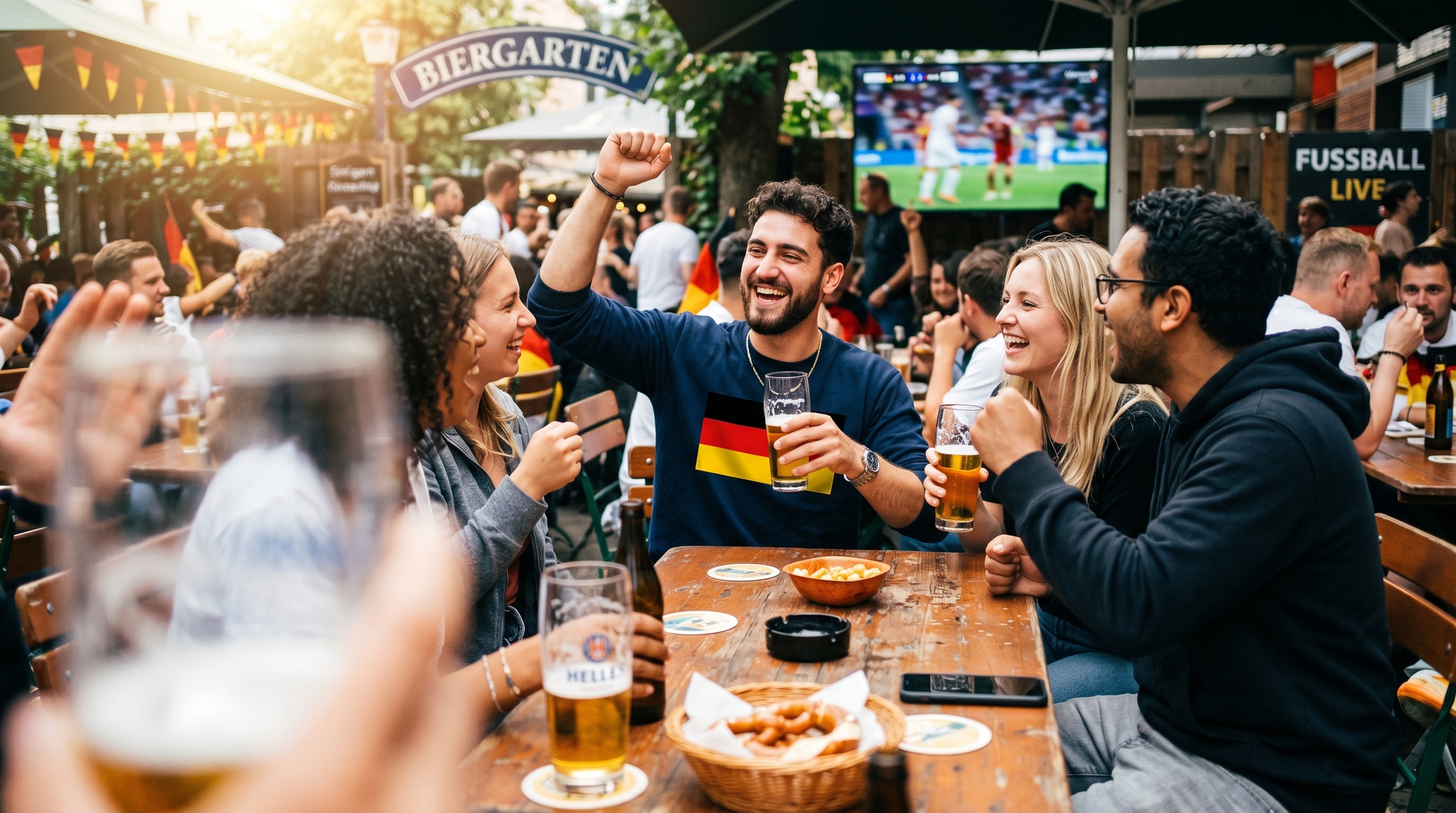
A live-sport venue may need different channels on different screens, selected programme audio in particular areas and rapid switching when a major event begins. The video-distribution architecture determines how easily the venue can do this.

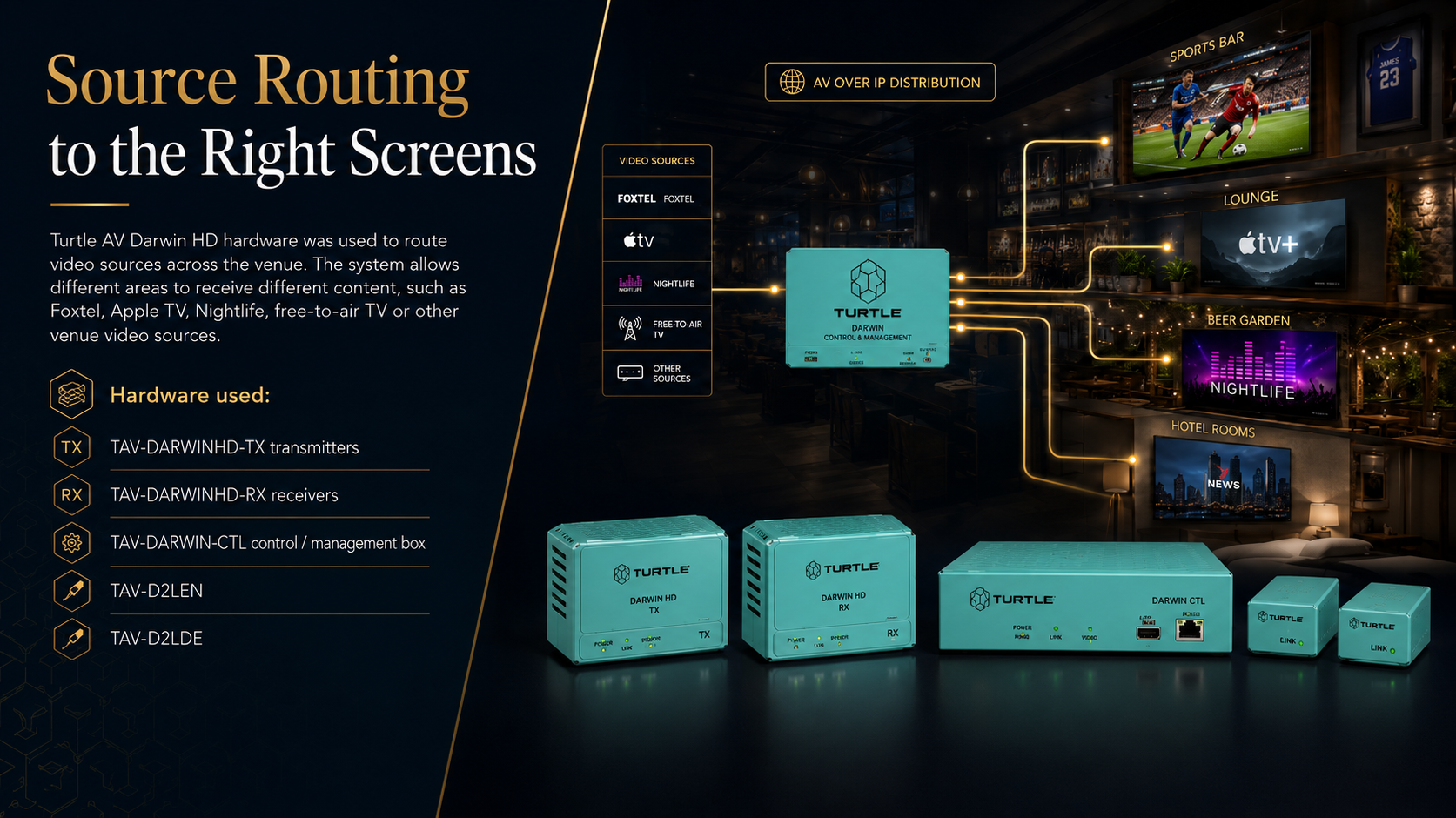
AV over IP video distribution for live sport screens in a hospitality venue
Networked video distribution allows authorised sources to be routed to selected screens and venue zones.
Screen Placement

Design for real sightlines

Check viewing distance, seating orientation, bar obstructions, glare, screen height and whether guests can see a display from the positions where they actually sit or stand.

Commercial Displays

Use displays designed for venue operation

Commercial displays provide professional mounting, control, connectivity and operating features suited to longer venue trading hours and managed installations.

Source Routing

Define all required video sources

Document free-to-air television, subscription sport, media players, venue promotions, digital signage, local presentation inputs and event sources.

Networked Video

Consider AV over IP for larger systems

An AV-over-IP system can distribute multiple sources across many displays without requiring a dedicated point-to-point cable path for every source and screen.

Read why the AV industry is moving from point-to-point distribution to AV over IP .
4. Functions and Events

Make the function room flexible without making it difficult to operate

Function-room AV must support different customers and event types: speeches, weddings, corporate presentations, celebrations, live entertainment, background music and private dining.

Speech and wireless microphones

Provide reliable handheld or headset microphones, clear loudspeaker coverage and simple mute and level controls for speeches, announcements and presentations.

Presentation inputs

Include practical HDMI, USB-C or wireless presentation options and make it clear where event organisers should connect their equipment.

DJ and entertainment connections

Provide documented input plates and suitable signal levels so DJs, performers and event suppliers do not need to access the main equipment rack.

Independent function-room mode

The function room should be able to operate separately from the main bar, dining areas and general venue music during private bookings.

Display or projection

Select screen size and brightness around room dimensions, seating positions, ambient light and the content likely to be presented.

Simple event presets

Presets such as Wedding, Speech, Presentation, Background Music and DJ can reduce setup time and prevent accidental changes to technical settings.

Outdoor rooftop and beer garden AV zones for a hotel or pub

5. Outdoor Venue AV

Treat outdoor AV as a separate design environment

Rooftops, courtyards, terraces and beer gardens create different installation and sound-control challenges from enclosed rooms. The system must suit weather exposure while directing sound toward guests rather than surrounding properties.

  • Select outdoor-rated loudspeakers and suitable mounting hardware
  • Consider rain, UV exposure, heat, salt air and cleaning practices
  • Use more controlled loudspeaker coverage where practical
  • Create separate outdoor volume and source controls
  • Protect connections, cabling and equipment from moisture
  • Plan after-hours operating limits and staff access
  • Consider display brightness, glare and weather protection

Outdoor circuits, outlets, containment and data connections should be coordinated with licensed electrical work and registered communications cabling .

6. Staff Operation

Staff should control the venue—not the equipment rack

A technically capable system can still fail operationally when everyday tasks require multiple remote controls, rack access or specialist knowledge. Staff control should reflect how the venue actually trades.

Simple staff audio visual control interface for a pub, hotel or club
A venue control interface should expose common tasks while protecting system configuration and technical settings.

Show controls by area

Organise the interface around Bar, Bistro, Rooftop, Function Room and other recognisable venue names rather than amplifier or equipment model numbers.

Limit everyday choices

Give staff access to source, volume, microphone and screen controls while keeping equalisation, routing and system setup protected.

Create trading presets

Presets can prepare multiple areas for normal trading, major sport, private events, late-night operation or venue closing.

Provide local inputs carefully

Bluetooth, AUX and DJ inputs can be useful, but their destination, priority and maximum level should be defined within the system design.

Platforms such as Q-SYS, Crestron and Extron can provide professional control interfaces and automation for larger venue systems.

7. System Backbone

Design the cabling, network and power at the same time as the AV

Speakers and screens are the visible part of the system. Long-term reliability depends on the equipment rack, network, power, structured cabling, cooling, documentation and access behind them.

Equipment Rack

Allow space, ventilation and access

The rack should be secure but accessible for support, with clear labelling, suitable cooling and enough capacity for the installed equipment and reasonable future expansion.

Network

Plan AV network capacity

AV over IP, Dante audio, control, digital signage and remote monitoring depend on correctly designed network switching, addressing, PoE, segmentation and documentation.

Cabling

Use structured, labelled cable routes

Cable routes should support displays, loudspeakers, control panels, local inputs, wireless access points and future changes without undocumented temporary wiring.

Electrical

Coordinate power and AV locations

Displays, amplifiers, racks, outdoor equipment and local connection points need power installed in the correct location and coordinated with the final AV layout.

Documentation

Keep drawings and source schedules

Handover documentation should identify zones, displays, sources, network devices, cable routes, equipment models and normal operating procedures.

Future Capacity

Allow for venue changes

Consider future screens, expanded outdoor areas, additional event inputs, new sport sources and changes to the function-room layout.

Masters Voice Technology combines commercial audio visual integration, electrical services and structured communications cabling through one delivery team.

8. Venue Content

Use digital signage for more than a static promotion

Digital signage can help a pub, hotel or club manage promotions, menus, function information, wayfinding and venue messaging across one or many displays.

Menus and daily specials

Update dining offers, bar promotions, event packages and venue information without replacing printed signage.

Sport and event promotion

Promote upcoming matches, live entertainment, functions and member events before the display is switched to live programme content.

Hotel and guest information

Hotels can use screens for reception messaging, conference schedules, room directions, venue facilities and local information.

Multi-site content management

Groups operating several venues can schedule approved content centrally while still allowing selected local information at each site.

Explore commercial digital signage systems or compare the main options in our digital signage platform guide .

9. Ongoing Reliability

Plan support before the venue is full and the system stops working

Hospitality AV normally operates during the periods when technical problems are most disruptive: busy dinners, major sporting events, private functions and weekend trading. Support arrangements should be established during the design stage.

Preventative Maintenance

Inspect before failure

Check loudspeakers, microphones, display mounts, ventilation, connections, wireless systems, amplifier operation and control interfaces at planned intervals.

Remote Support

Diagnose suitable systems remotely

Network-connected control and monitoring can help identify offline devices, communication faults and system status before an onsite attendance is arranged.

Staff Training

Train more than one operator

Provide simple written instructions and train managers, supervisors and relevant event staff rather than relying on one employee who may not always be onsite.

Lifecycle Planning

Replace ageing equipment strategically

Maintain an asset record for displays, amplifiers, processors, microphones, network switches and content devices so upgrades can be planned rather than triggered only by failure.

Venues seeking a structured design, installation, support and refresh model can also review TechFlow360 AV as a Service .

Venue AV in Practice

Sydney Park Hotel: one system supporting different jobs across the venue

The Sydney Park Hotel project demonstrates how a multi-level hospitality AV system can support everyday trading, live sport, rooftop use, private events, venue promotions and practical staff operation.

Sydney Park Hotel audio visual installation by Masters Voice Technology and ACCAV
Multi-level venue AV installation incorporating zoned sound, commercial displays, networked video and practical staff controls.
Installed System

Technology delivered across the venue

  • Multi-zone audio for bars, dining and rooftop areas
  • Commercial LG displays
  • AV-over-IP video distribution
  • Function-room audio and presentation inputs
  • Wireless microphones
  • Bluetooth, AUX and DJ connection points
  • Digital signage capability
  • Data cabling and electrical integration
Operational Outcomes

Designed around hospitality workflows

  • Different audio levels and sources in different areas
  • Flexible live-sport routing across screens
  • Independent rooftop and function-room operation
  • Local inputs for functions and entertainment
  • Simple control for authorised staff
  • Commercial infrastructure suited to ongoing support

View the complete Sydney Park Hotel AV case study .

Preparing a Venue AV Brief

Information to collect before requesting an AV design

A clear venue brief helps the AV integrator understand the required zones, sources, trading conditions, existing equipment and future plans before preparing a system design and quotation.

Planning area Information to provide Why it matters
Venue zones Bar, dining, gaming, reception, function rooms, rooftop, beer garden, accommodation and back-of-house areas. Determines independent audio, video and control requirements.
Audio sources Background music, sport audio, microphones, DJ input, Bluetooth, local media and event systems. Determines routing, input hardware and source priorities.
Video sources Free-to-air television, subscription sport, signage players, promotional content and local presentation inputs. Determines the video-distribution architecture and screen control.
Displays Existing screen quantities, sizes, mounting positions and desired additional locations. Helps assess sightlines, reuse, power, cabling and mounting.
Functions and events Weddings, speeches, corporate events, live music, DJs, presentations, private bookings and sporting events. Defines microphones, local inputs, presets and room independence.
Existing infrastructure Equipment racks, cabling, amplifiers, loudspeakers, network switches, power and control systems. Identifies equipment that may be reused and infrastructure gaps.
Trading restrictions Access hours, shutdown windows, noise restrictions, event dates and areas that must remain operational. Allows installation and commissioning to be staged around trading.
Support requirements Response expectations, remote access, maintenance intervals, spare equipment and staff training. Establishes the appropriate ongoing support model.

Venue owners and operators can discuss a new system, existing-system upgrade or site assessment with the Masters Voice Technology and ACCAV venue AV team .

Frequently Asked Questions

Pub, hotel and club AV system questions

What AV equipment does a pub or club normally need?

A typical pub or club AV system may include zoned loudspeakers, amplifiers, digital signal processing, commercial displays, live television sources, AV-over-IP or matrix video distribution, microphones, local music inputs, digital signage and a staff control interface. The exact system depends on the venue zones, functions, trading style and existing infrastructure.

What is a multi-zone audio system?

A multi-zone audio system divides the venue into independently controlled areas. The bar can play sport audio, the dining area can use quieter background music and the function room can run a private event at the same time. Each zone can have its own source, volume and operating limits.

How can a venue show different sport channels on different screens?

A video-distribution system routes selected sources to selected displays. Smaller systems may use a conventional matrix, while larger venues may benefit from AV over IP. The control interface can allow authorised staff to choose the required source for each screen or group of screens.

Should pubs and hotels use commercial displays instead of televisions?

Commercial displays are generally better suited to managed venue installations because they provide professional control, connectivity, mounting and operating features. The correct model should be selected around operating hours, brightness, location, content and warranty requirements.

Can an existing venue sound system be upgraded?

Yes. Existing loudspeakers, amplifiers, displays, cabling, racks and control equipment can be assessed for safety, condition, compatibility and remaining service life. Suitable equipment may be retained while failed or limiting components are replaced in stages.

What AV does a hotel function room need?

A hotel function room may need wireless microphones, background music, speakers, displays or projection, presentation inputs, DJ connections and simple event presets. It should also be capable of operating independently from general hotel audio during private bookings.

Can outdoor speakers be installed in a beer garden or rooftop?

Yes. Outdoor AV should use equipment, connections, cabling and mounting hardware selected for the expected weather exposure. The loudspeaker layout should also control coverage and provide independent outdoor volume settings.

Can electrical and data cabling be included in the venue AV project?

Yes. Masters Voice Technology can coordinate venue AV installation, licensed electrical work and registered communications cabling through one delivery team. The scope can include display power, equipment-rack power, structured cabling, network connections, containment and outdoor infrastructure.

Where does Masters Voice Technology provide venue AV services?

Masters Voice Technology and ACCAV support hospitality and venue AV projects across Greater Sydney and regional New South Wales, including established service coverage through Sydney and the Mid North Coast. Site assessments and project meetings should be arranged before attendance.

Contact Our Team

Talk to Masters Voice Technology about your next project.

Tell us about your organisation, site, existing technology and project requirements. Our team can assist with commercial audio visual design, installation, electrical and communications works, system upgrades, maintenance and managed support.

Project Enquiry

How can our team help?

Complete the details below and your enquiry will be emailed directly to the Masters Voice Technology sales team.

Thank you. Your enquiry has been sent to the Masters Voice Technology sales team. We will review the information and contact you shortly.

Your enquiry will be sent directly to sales@mastersvoice.com.au. Required fields are marked with an asterisk.

Ready to talk about your project?